
Online shopping wins its place in retail worldwide, with 24% of all purchases to be made in the digital space by 2026. This economic activity attracts many enthusiasts willing to earn money by selling goods and services in just several clicks. If you’re here, you’re one of them.
That’s where you may arrive at the first crossroads. You need a website and an eCommerce content management system (CMS) to operate the store. There are dozens of solutions out there, each with its own peculiarities and capabilities.
Some tools are better for smaller ventures, offering basic features to sell without headaches. They may have a user-friendly drag-and-drop interface and provide support from the vendor. Others suit bigger companies that are ready to hire professionals to build an unparalleled user experience. They may require more preparation and coding.
The choice is serious. You may pick a tool but find it doesn’t meet your needs too late. In that case, migration won’t be smooth sailing. Fear not. In this article, we’ll overview top eCommerce CMS systems and give tips on finding the best one to fulfill your goals.
Table of Contents
What Is an eCommerce CMS?
An eCommerce CMS, or content management system, is where you’ll develop and manage the store. To make it clear, let’s briefly explain how you may create a website:
- Coding from scratch. It’s one of the most time-consuming and resource-intensive approaches. To launch a website, developers use programming languages like HTML, CSS, JavaScript, and potentially server-side languages like PHP, Python, or Ruby. Building from the ground up is fine if you require specific functionalities or unique design elements that pre-built CMS platforms may not support. Yet, this option is the most demanding, so you may need to opt for web development services like these https://onilab.com/services/magento-development-services.
- Developing on the basis of a CMS and website builders. That’s where you also need professional help (for example, hire developers at a trustworthy development company), but the work is much faster and easier. It’s one of the most common approaches to website building. You can utilize out-of-the-box features and customize the platform with additional coding and plugins.
- A hybrid approach is about using a CMS for the core website and then integrating custom-coded elements or external systems for specific functionalities.
A CMS serves various purposes, such as:
- Streamlining product management;
- Updating content from product descriptions to blog posts;
- Climbing the Google ranks;
- Protecting the site;
- Scaling as the business grows.
It’s where all the magic happens—products are showcased, and transactions are carried out. It’s where you manage content, handle inventory, process orders, and engage with customers.
SaaS and Open-Source CMS: What’s the Difference?
When exploring various systems, you may notice that there are two dominating types: SaaS (software as a service) and open-source platforms. The former relies on frequent payments (monthly or yearly) for using the platform. It’s similar to renting a house. You have less freedom to work with the platform codebase but get a ready-to-go CMS, maintenance included.
Open-source platforms like Magento remind building a house. You need to set up, host, and maintain them yourself – or hire someone to do it. They’re normally free to install, but you still need to search and pay for hosting, development, and integration with third-party software.
| SaaS CMS (e.g., Shopify, BigCommerce) | Open-Source CMS (e.g., WooCommerce, Magento) | |
|---|---|---|
| Pros |
|
|
| Cons |
|
|
Functions and Features Needed in an eCommerce CMS
The functions and features of an eCommerce CMS are the crucial stuff that keeps the store effective and customers happy. Primary functions and capabilities include:
- Content management: It’s where you create, edit, and manage all the content on the site – from product descriptions to blog posts. A good CMS makes this process intuitive, enabling you to update a product detail or post a new article with ease.
- Order management: Your CMS needs to support everything from processing orders to tracking shipping. This process should be seamless for you and your shoppers. If something goes south, you might have to deal with a ton of complaints from users.
- Customer experience enhancement: It revolves around the way your site looks and feels to visitors. It’s great to have an eye-catching storefront. It’s even more important to have a user-friendly one. The CMS should provide features like easy navigation, quick load times, and practical search functionality.
Advanced features that might give you a competitive edge are as follows:
- SEO optimization: A CMS should be easy to edit SEO-wise. It means clean URLs, easy-to-edit meta tags, sitemap support, and other tactics to help the site rank high in search results.
- UX design flexibility: If the CMS lets you edit the UX design, you get more options to deliver the brand vibe through the website. It’s like being able to repaint the store and rearrange the shelves whenever you like.
- Omnichannel capacity: Consumers hop from mobile to desktop to tablet and back again. A CMS should keep up, providing a consistent and engaging experience across all channels, be it on a phone screen or a laptop.
Boosting the Content Strategy and User Engagement
All these features make things easier for you. But that’s only half of the deal. They also hook the audience. Excellent content management means keeping the site fresh and exciting, encouraging customers to return. Smooth order management eliminates disruptions during the critical checkout process. It enhances client loyalty, trust, and satisfaction.
When you add the advanced features – SEO optimization gets you seen, UX design grabs attention, and omnichannel capacity keeps you connected with shoppers across all platforms. It’s like having a conversation with customers, where the site listens and responds just as well as it speaks.
As you can see, choosing a CMS goes beyond picking software. You determine how users perceive and interact with your brand.
Overview of Leading eCommerce CMS Platforms
Now, let’s lay out some key players in the market in a straightforward table, highlighting their strengths, weaknesses, and where they shine the brightest. Plus, I’ll toss in some store examples for good measure.
| CMS Platform | Overview | Strengths | Weaknesses | Best Use Cases |
|---|---|---|---|---|
| Shopify | One of the most popular SaaS eCommerce platforms; offers various pricing levels depending on the desired features. | User-friendly; excellent support; a variety of editable templates; mobile-friendly. | Limited customization; advanced features and in-depth reports are available at higher-priced plans; the need to pay transaction fees if you don’t use the native payment gateway. | From startup merchants and small businesses to more prominent brands. |
| Magento (Adobe Commerce) | An open-source platform owned by Adobe; has two paid plans, including one hosted on the cloud. | Highly customizable; scalable. | Requires technical expertise; expensive. | Best for large businesses with complex needs. |
| BigCommerce | Cloud-based; provides four pricing plans, including one custom package for enterprises. | Robust and adaptable website editor; the ability to change HTML and CSS code; editable templates; strong SEO features. | Can be complex for beginners; the more sales there are, the higher the price. | Suited for fast-growing businesses of all sizes. |
| WooCommerce (WordPress) | It’s a plugin for a WordPress CMS for transforming the platform into an online store; open-source. | Immense selection of free and paid extensions and themes; the ability to extend the functionality with third-party add-ons. | Requires WordPress; installing plugins may pose a risk to security and loading speed; limited in-built functionality. | Perfect for businesses already using WordPress, startups, and small brands. |
| OpenCart | Open-source; free; multifunctional. | A large plugin marketplace; quick and easy setup; incorporates eight delivery options and more than 20 payment channels; the capability of using a single account to manage several stores; responsiveness across diverse devices. | Templates may seem somewhat out of date in comparison to other CMSs. | Suitable for small to medium businesses on a tight budget. |
| PrestaShop | Open-source; free. | Highly adaptable; wide choice of add-ons; customizable backend. | Lack of free support; requires technical maintenance; pricey modules from $52.75 to $7386. | Great for small to medium-sized businesses with little to no tech skills. |
| Wix | To enable the eCommerce functionality, you need to install a specialized module; offers five pricing plans, ranging from Light with basic features to Enterprise for managing a scaling business. | Drag-and-drop and no-code website builder; beginner-friendly; a variety of templates and built-in features. | Limited eCommerce tools compared to others as it’s not technically an ecommerce CMS. | Best for small businesses and solo entrepreneurs. |
| Joomla | Open-source; although it isn’t built for eCommerce, there are several free plugins for converting a Joomla website into an online storefront. | Flexible; good content management; cost-efficient. | May lack eCommerce capabilities. | Suitable for content-heavy sites. |
| Drupal | Open-source. | Incredibly flexible; compatible with the BigCommerce plugin to combine a fully customizable frontend and fully hosted backend. | Not very user-friendly. | Ideal for complex, large-scale eCommerce sites. |
| Squarespace | Hosted; comes with 2 Commerce plans (basic and advanced) and provides a free trial period. | 100+ editable and eye-pleasing templates; a drag-and-drop interface; a mobile-friendly shopping cart. | Limited integrations, customization, and eCommerce capabilities. | Great for artists, small retailers, and creatives. |
Successful Store Examples Across Different CMS Platforms
Each eCommerce CMS is more than just a set of features. Companies choose particular solutions that will accompany them on their journey, whether they aim to create a powerful and one-of-a-kind website or a vivid online store with abundant content. Let’s take a look at the renowned brands leveraging various eCommerce platforms overviewed in the table above.
We’re about to see how the theoretical translates into the practical. From Gymshark on Shopify to Sunday State’s chic presence on Squarespace, these shining examples testify that the right CMS is all about matching a brand’s unique needs.
1. Gymshark (Shopify)
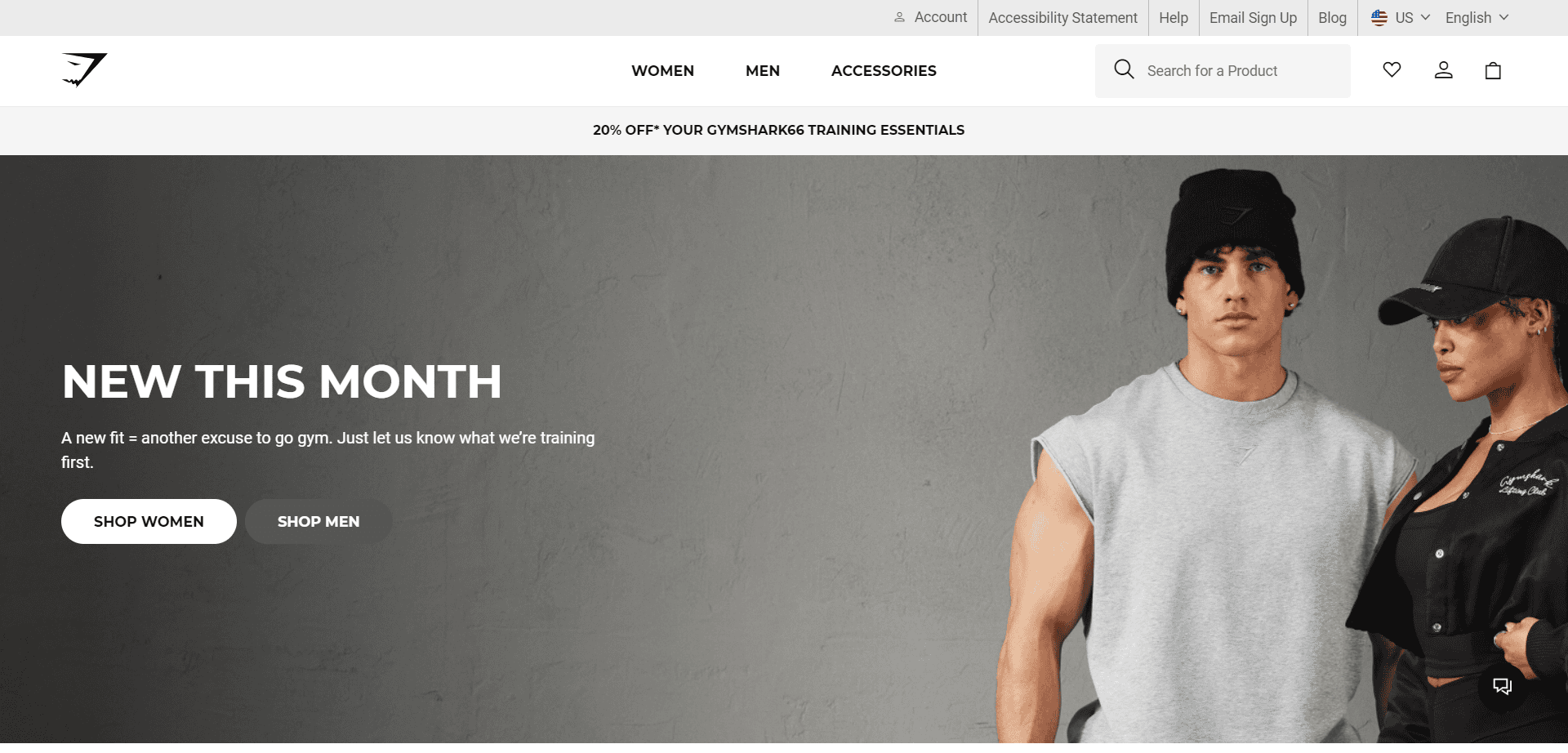
Screenshot taken on the official Gymshark website
The Gymshark website demonstrates all the Shopify capabilities to create smooth navigation and a swift checkout process. Located in the UK, the company is one of the most prosperous brands on Shopify. Here is what the store boasts thanks to choosing this CMS:
- a minimalist design;
- easy-to-navigate collections;
- a comprehensive apparel line;
- 14 variations of the website: 13 for models specific to each region and one for the “rest of the world”.
Its store is a striking illustration of how Shopify’s global features can adapt to match any market, anywhere in the world.
2. Christian Louboutin (Magento)
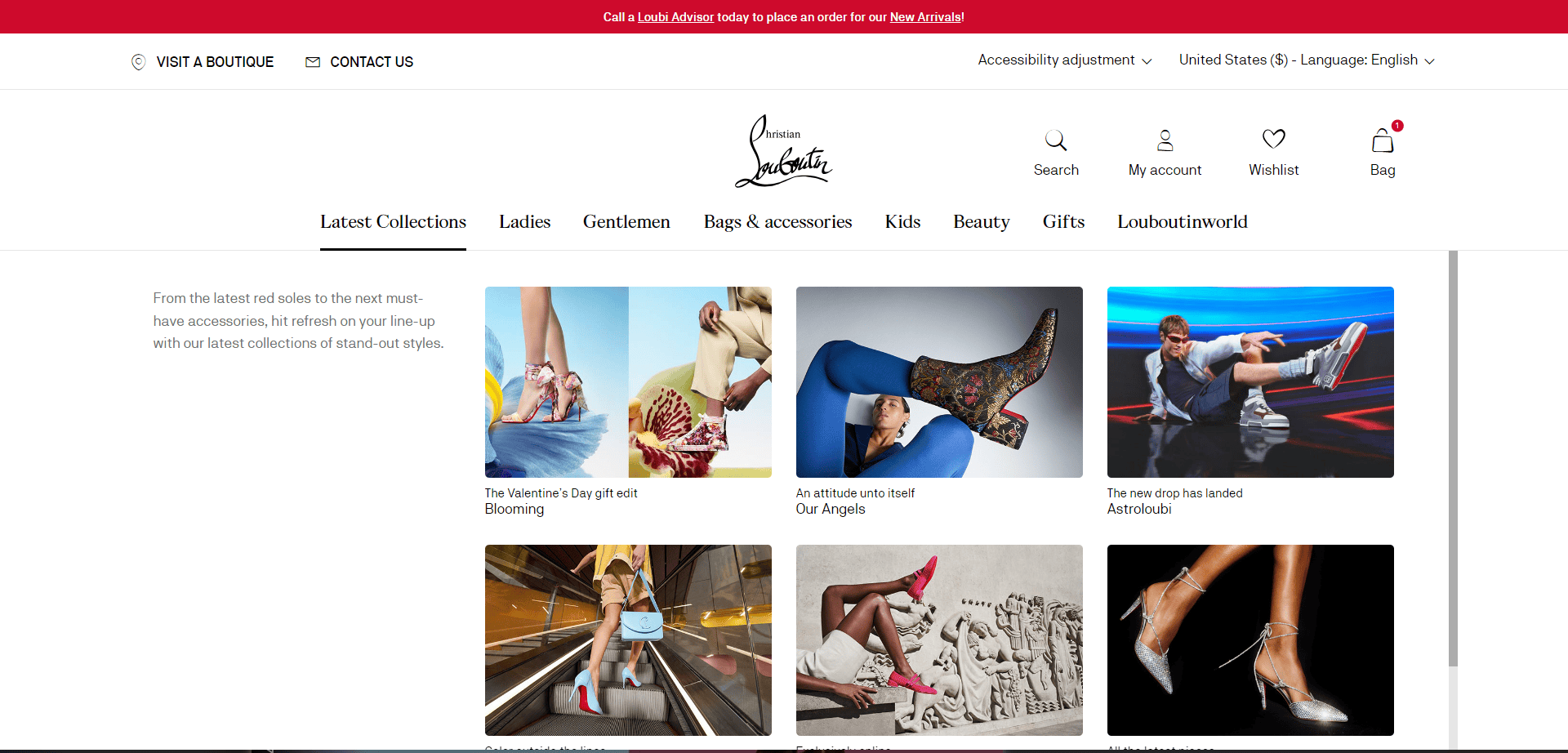
Screenshot taken on the official Christian Louboutin website
The Christian Louboutin website on Magento is what happens when luxury and digital elegance come together. Here is where the platform really shines in creating a sophisticated, high-end store environment. As recognizable as its red-soled shoes, the Louboutin website provides features such as:
- gift guides that hit the mark;
- extensive product pages;
- a visualized navigation menu;
- an editable pop-up cart.
It’s a harmonious blend of brand essence and functional artistry.
3. Burrow (BigCommerce)
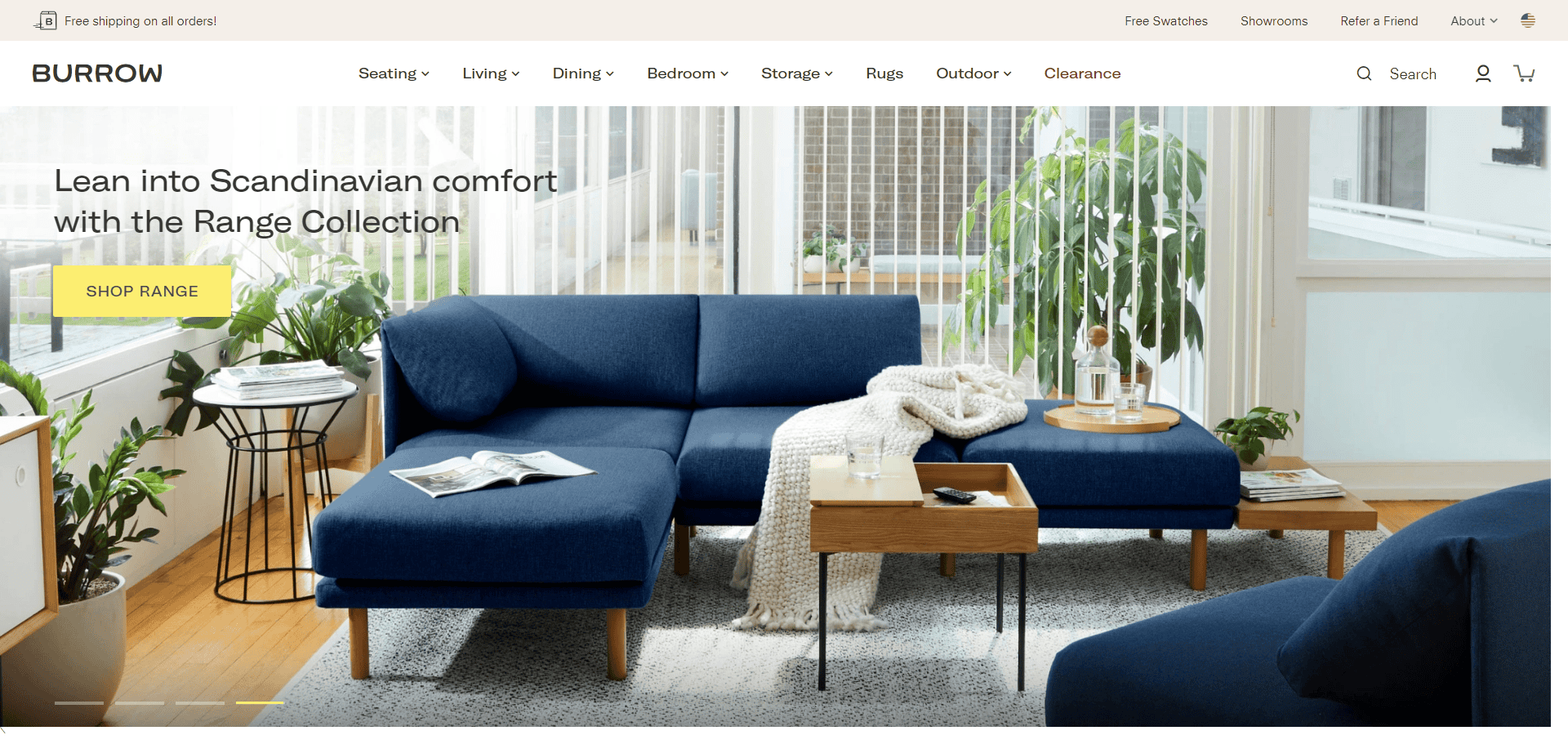
Screenshot taken on the official Burrow website
The story of Burrow and BigCommerce is one of change and flexibility. The furniture store’s website, which features a wide variety of products and intricate options, reflects how skillfully the platform manages growth and variation.
Burrow’s co-founder, Kabeer Chopra, credits BigCommerce for striking the perfect balance between affordability and rich functionality. It’s worth noting that the website is built with the user in mind:
- calls-to-action are self-explanatory and noticeable against a variety of colors on the background;
- the shopping cart pop-up appears on the page upon adding the product to the cart without disrupting the user experience;
- the store recommends related products to those added to the cart and viewed, which is convenient when planning a cohesive interior design.
Burrow needed extensive customization and multi-vendor operations. As we can see, it found a robust and flexible ally in BigCommerce.
Conclusion: Making the Right CMS Choice
Alright, let’s wrap this up. Choosing the suitable CMS for your online store is a far-reaching decision. You pick a business partner that’ll stick with you no matter what. That’s why you need to find the sweet spot where the platform’s capabilities meet your growth ambitions.
Remember the following takeaways:
- The system shouldn’t complicate the shopping experience on the website.
- Find out whether the CMS can adjust to the changing needs of an evolving business.
- Customization can set you apart but requires technical expertise.
- Having an active community and reliable support can mean a lot when store management gets tough.
- Factor in everything from subscription fees to maintenance costs.
Now, before you make your move, pause and ponder. Where is your venture headed? What do you need to get there? Consider your team’s skills, time for maintenance, and where you see the company in the future.
Remember, this isn’t a one-time decision – it’s a long-term relationship. So, choose a CMS that aligns with your business strategy and is ready to expand as you do. Take your time, weigh the options, and pick a platform that perfectly matches your expectations.
---
About the Author

Art Malkovich is CEO and co-founder at Onilab, a development company focused on eCommerce. He has unique knowledge and comprehensive experience in online store development and project management. Aspiration to keep the company on the top of the market encourages Art to constantly research the spheres of headless commerce and PWA, UX/UI design and m-commerce, SaaS, and B2B in general.